

Web Encoder
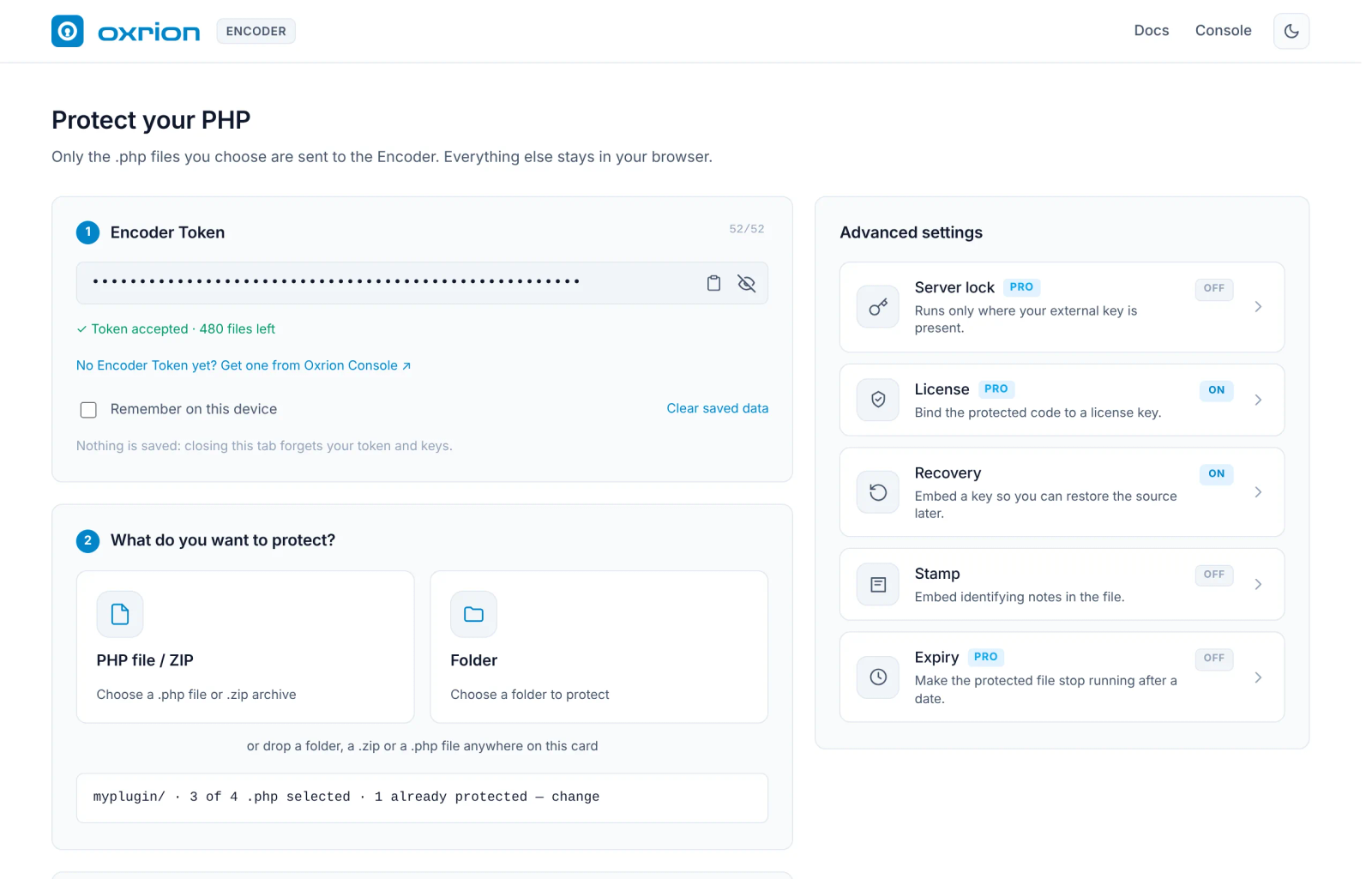
The Web Encoder at encoder.oxrion.com is the Encoder of Oxrion Desktop, in your browser. You paste your Encoder Token, drop your project, choose what to protect, and download the protected project as a .zip. Nothing to install.
It only protects code. Issuing licenses, License History, Recovery and the Vault stay in Oxrion Desktop and the CLI, where they work offline.
1. Encoder Token
Section titled “1. Encoder Token”Paste your token into Encoder Token. Don’t have one yet? Get it from the Oxrion Console — see Account & Encoder Token. Once the token is accepted, you see how many files you have left this month.
By default the page forgets your token when you close the tab. Tick Remember on this device to keep it in this browser; see What the page saves.
2. What do you want to protect?
Section titled “2. What do you want to protect?”Choose PHP file / ZIP or Folder, or drop one folder, one .zip or one .php file anywhere on the card.
For a folder or a .zip, Choose what to protect opens and lists the project’s .php files, all selected by default. It works like Choose files in Oxrion Desktop: untick what should stay readable, filter by name, and press Confirm selection.
- Files that are already protected are skipped.
- If the project has an
oxrion.ignore, its choices are applied. If it has anoxrion.stamp, its notes are loaded into Stamp; turn Stamp on to use them. .gitfolders and.envfiles are never put into the output.- The page can’t write to your project, so your choice isn’t saved to
oxrion.ignore. To keep a choice for next time, save it from Oxrion Desktop, or add the file yourself.
3. Output
Section titled “3. Output”You download one .zip named <project>-protected.zip, with the same layout as what you dropped.
Also copy non-protected files (on by default) puts the rest of your project — images, templates, and the .php files you left out — into the .zip as they are, so it is ready to upload. Turn it off to get only the protected files.
Advanced settings
Section titled “Advanced settings”The panel on the right holds the same protection options as Oxrion Desktop: Server lock, License, Recovery, Stamp and Expiry. Paste the keys they need, or create them on the page:
| Option | Create it on the page |
|---|---|
| Server lock | Generate a new external key. Copy it now: the page doesn’t save it. The window shows the environment variable to set on your server. |
| License | No license key yet? Generate a keypair |
| Recovery | No recovery key yet? Generate a keypair |
A new keypair is created in your browser, in the same format as Oxrion Desktop, and is never sent anywhere. The private key is shown once: press Download key file, tick I saved the key file, then Use public key. Keep the file safe — you need the private key to issue licenses or recover source, and a lost private key can’t be recovered. You can add it to your Vault later with + Add key.
Server lock, License, Expiry and Stamp’s custom notes need a paid plan or credits, exactly as in Oxrion Desktop. See Plans, quota & credits.
Protect
Section titled “Protect”Press Protect. The page first checks your token, your quota and your plan, before any file is sent. Then the selected files are protected in batches, and the .zip is built in your browser and downloaded.
You then see Protection complete, Protection finished with errors or Nothing was protected, with how much of your quota is left. Files that couldn’t be protected are listed in View details and in OXRION-FAILED-FILES.txt inside the .zip, and are left out — never copied unprotected. Download again saves the same .zip once more without using quota.
What the page saves
Section titled “What the page saves”| What | Saved? |
|---|---|
Your project and the protected .zip | Never. Your project is read in the browser; only the selected .php files are sent to the Encoder, and nothing is kept there. |
| Encoder Token, license and recovery public keys | Only for this tab, unless you tick Remember on this device — then in this browser only. Clear saved data removes them. |
| External key (Server lock) and private keys | Never. |
The page loads no analytics or third-party scripts, and can only connect to the Oxrion Encoder. See Data & privacy.
Web Encoder or Oxrion Desktop?
Section titled “Web Encoder or Oxrion Desktop?”| Web Encoder | Oxrion Desktop | |
|---|---|---|
| Install | Nothing | App for Windows, macOS and Linux |
Protect a file, folder or .zip | Yes | Yes |
| Protection options | All | All |
| Licenser, License History, Email & Hooks, Recovery | — | Yes, offline |
| Keys | Pasted, or created on the page and shown once | Kept in your encrypted Vault |
| Output | A .zip download | A folder or a .zip |
| Project size | Up to a few hundred MB | Any size |
| Encoder Token, plan and quota | The same | The same |
Files protected in either one are the same, and run with the same Loader.
Common messages
Section titled “Common messages”| Message | What to do |
|---|---|
| An Encoder Token starts with oxe_ and has 52 characters | Paste the whole token. |
| Oxrion didn’t accept this Encoder Token | Check the token, or generate a new one in the Oxrion Console. Only your newest token works. |
| Service unavailable | Oxrion couldn’t be reached. Check your connection and press Try again. |
| Insufficient quota | Press Select files to protect fewer, wait for your quota to renew, or use credits. |
| Some options aren’t in your plan | Turn those options off, upgrade your plan, or choose Protect without them. |
| This browser cannot create keys | Update your browser, or create the keys in Oxrion Desktop. |
For a very large project, use Oxrion Desktop: the browser holds the whole project in memory.