

Plans, quota & credits
Protecting code uses quota (from your plan) or credits (bought separately). Everything else — issuing licenses, recovery, the Vault — is free and unlimited, with or without an account.
Free and paid plans
Section titled “Free and paid plans”| Free | Solo, Pro, Max | |
|---|---|---|
| Files per month | 20 | Depends on the plan |
| Protected files run for | 30 days | No time limit |
| TRIAL note in the file | Yes | No |
| Server lock, License, Expiry, Stamp custom notes | — | Yes |
| Recovery, Stamp system notes | Yes | Yes |
Free needs no subscription: every account can protect up to 20 files a month. Free files stop running 30 days after you protect them, and start with this note:
/* * Protected by Oxrion TRIAL VERSION */The paid plans — Solo, Pro and Max — include every option and differ only in their monthly quota. See oxrion.com/pricing for current plans and prices.
Monthly quota
Section titled “Monthly quota”Each protected file uses one file of your monthly quota.
- Quota renews every month — on the day your subscription started, or on Free, the day you created your account.
- Protecting the same file again is free. A file with exactly the same content as one you already protected doesn’t use quota again. Once you change the file, it counts as a new file.
Before protecting, Oxrion Desktop checks that you have enough quota for the files you selected. If you don’t, it tells you how many files you can protect, so you can protect fewer — nothing is sent until it fits.
Credits
Section titled “Credits”Credits are extra files you buy in the Oxrion Console, on top of — or instead of — a subscription.
- Credits never expire. They stay in your account until you use them.
- Every protection uses a credit, even for a file you protected before.
- Credits unlock everything. Files protected with credits have every option available, no TRIAL note and no 30-day limit — even without a subscription.
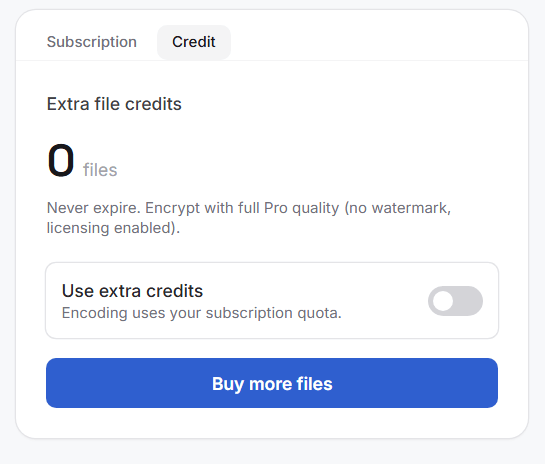
To use credits, turn on Use extra credits in the Console. While it’s on, protecting uses credits only: when they run out, protecting stops until you buy more or turn the switch off to use your subscription quota again.
After each protection, Oxrion Desktop shows the quota left as reported by Oxrion — for the credits or the monthly quota you’re using.
Changing your plan
Section titled “Changing your plan”Subscribe, change or cancel your plan from the Oxrion Console.
When you cancel, your plan stays active until the end of the period you paid for. Files you protected on a paid plan or with credits keep running after it ends.
Refunds
Section titled “Refunds”- First payment of a subscription — full refund within 14 days if you’ve protected no more than 20 files with the plan. Try Oxrion on the Free plan first.
- Credits — an unused credit pack can be refunded within 14 days of purchase.
- Renewals aren’t refunded; cancel before your renewal date.
Email support@oxrion.com from your account’s address. See the Terms of Service.